operation
In Whistle, each rule consists of two parts: Pattern (pattern) and Operation (operation). The general syntax for operation is:
protocol://[value]- protocol: Specifies the operation type (such as
file,proxy,resReplace, etc.) - value: Operation content (supports multiple formats, see below)
Inline Values
pattern reqHeaders://x-proxy=Whistle   # Set request headers
pattern statusCode://404               # Modify status code
pattern file://({"ec":0})              # Respond with inline content (value inside parentheses: `{"ec":0}`)
When the operation content (Value) contains spaces, line breaks, or special characters, inline method cannot be used directly. Use the following alternative methods instead:
Embedded Values
``` ua.txt
Mozilla/5.0 (iPhone; CPU iPhone OS 16_6 like Mac OS X) AppleWebKit/605.1.15 (KHTML, like Gecko) Version/16.6 Mobile/15E148 Safari/604.1
```
pattern ua://{ua.txt}
Equivalent to:
``` headers.json
user-agent: Mozilla/5.0 (iPhone; CPU iPhone OS 16_6 like Mac OS X) AppleWebKit/605.1.15 (KHTML, like Gecko) Version/16.6 Mobile/15E148 Safari/604.1
```
pattern reqHeaders://{headers.json}
Values References
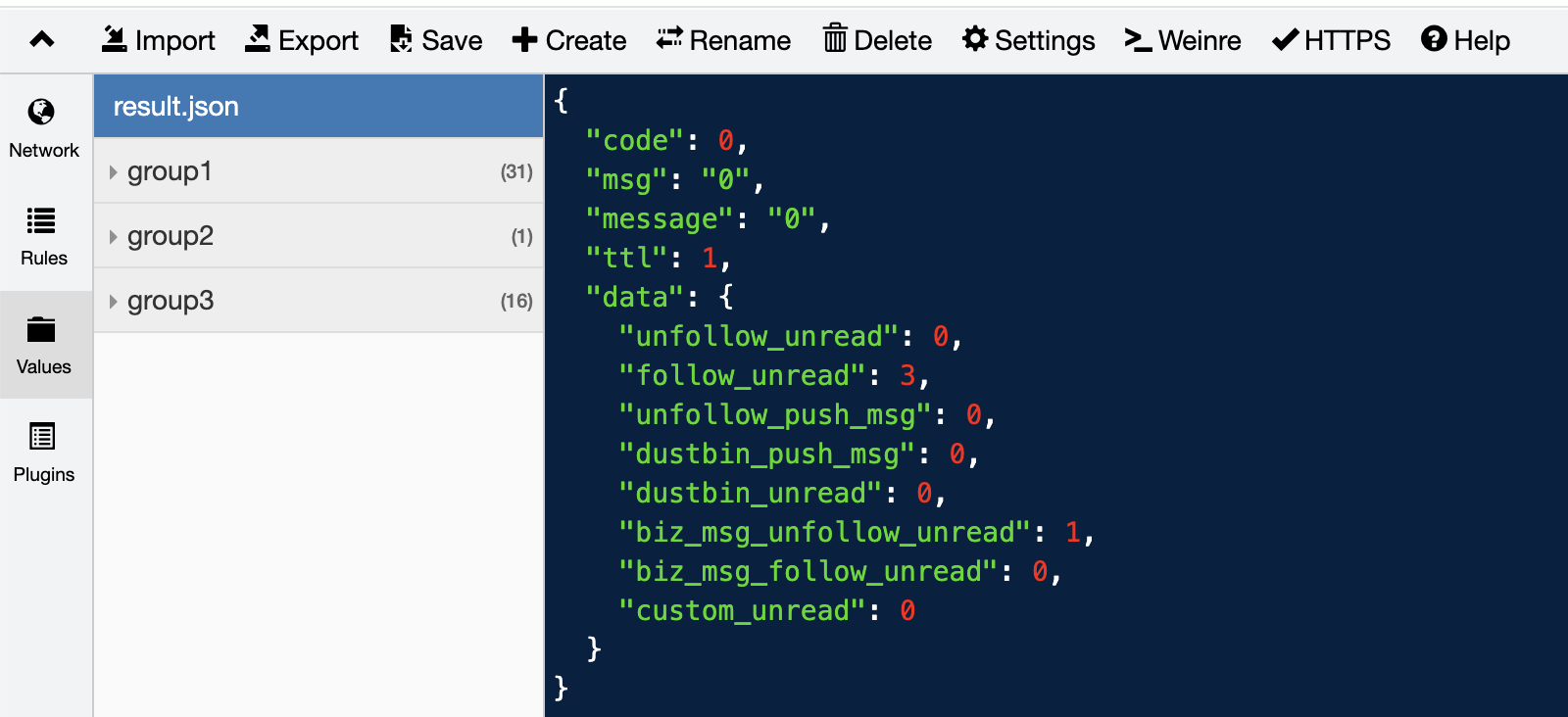
When operation values (Value) need to be shared by multiple rules, embedding them directly in rules makes them non-reusable. In such cases, these values can be stored in the Values module of the Whistle interface and referenced by key name:
- Create a key named
result.jsonin Values and fill in the operation content - In rules, reference it via
{result.json}, e.g.:www.test.com/cgi-bin/test file://{result.json}
File/Remote Resources
pattern reqHeaders:///User/xxx/filepath             # Load operation content from local file
pattern resHeadrs://https://example.com/config.json # Load JSON object from remote URL
pattern resHeaders://temp/blank.json                # Through editing temporary files
⚠️ Note: Protocols like http/https/ws/wss/tunnel/host/enable/cache... prohibit obtaining content via file paths or remote URLs. See each protocol's documentation for details.
Temporary Files
When frequent content editing is needed, you can use Whistle's temporary file functionality.
pattern protocol://temp.jsonOperation Steps:
- In the Rules editor, hold
Command(Mac) /Ctrl(Windows) - Click with mouse on
protocol://temp.json - Enter the response content in the pop-up editing dialog
- Click
Saveto save
Parentheses Usage
In Whistle rules, the value part of protocol://value can have three types of indirect references:
{key}- Reference embedded valuesremote-url- Remote resource addresslocalfilepath- Local file path
When you need to directly reference the above content itself (rather than what they indirectly reference) as operation content, you can wrap it with parentheses:
protocol://(value)Examples:
reqHeaders:///User/xxx/yyy.txt- Load operation content from local file/User/xxx/yyy.txtreqHeaders://(/User/xxx/yyy.txt)- Treat/User/xxx/yyy.txtdirectly as operation content
Template Strings
Whistle provides template string functionality similar to ES6, allowing you to dynamically reference request information and apply it to rule configurations. Supports the following template string types:
General Inline Values
pattern protocol://`...${version}...`Embedded Values or Values References
``` test.key
...${reqId}...
...${version}...
```
pattern protocol://`{test.key}`
Parenthesized Content
pattern protocol://`(...${now}...)`String Variables
| Variable Name | Value |
|---|---|
${now} | Date.now() |
${random} | Math.random() |
${randomUUID} | crypto.randomUUID() |
${randomInt(n)} or ${randomInt(n1-n2)} | Get a random positive integer from [0, n] or [n1, n2] (Added in: v2.9.104) |
${reqId} | ID assigned by Whistle to each request |
${url.protocol} | url.parse(fullUrl).protocol |
${url.hostname} | url.parse(fullUrl).hostname |
${url.host} | url.parse(fullUrl).host |
${url.port} | url.parse(fullUrl).port |
${url.path} | url.parse(fullUrl).path |
${url.pathname} | url.parse(fullUrl).pathname |
${url.search} | url.parse(fullUrl).search |
${query.xxx} | Value of request parameter xxx |
${url} | Complete request URL |
${querystring} | url.parse(fullUrl).search || '?' (not empty) |
${searchstring} | url.parse(fullUrl).search || '?' (not empty) |
${method} | Request method |
${reqHeaders.xxx} | Value of request header field xxx |
${resHeaders.xxx} | Value of response header field xxx |
${version} | Whistle version number |
${port} | Whistle port number |
${host} | Network interface IP that Whistle listens on (empty by default) |
${realPort} | port displayed in Whistle interface's Online dialog (usually Whistle port number) |
${realHost} | host displayed in Whistle interface's Online dialog (usually the network interface IP that Whistle listens on) |
${clientIp} | Client IP |
${clientPort} | Client port |
${serverIp} | Server IP |
${serverPort} | Server port |
${reqCookies.xxx} | Value of request cookie xxx |
${resCookies.xxx} | Value of response cookie xxx |
${statusCode} | Response status code |
${env.xxx} | process.env.xxx |
${whistle.plugin-name} | value of whistle.plugin-name://value or plugin-name://value |
${whistle.plugin-name}may only have values in internal rules of plugins
Example
``` test.txt
now: ${now}
random: ${random}
randomUUID: ${randomUUID}
reqId: ${reqId}
url.protocol: ${url.protocol}
url.hostname: ${url.hostname}
url.host: ${url.host}
url.port: ${url.port}
url.path: ${url.path}
url.pathname: ${url.pathname}
url.search; ${url.search}
query: ${query.name}
url: ${url}
querystring: ${querystring}
searchstring: ${searchstring}
method: ${method}
reqHeaders.accept: ${reqHeaders.accept}
resHeaders.content-type: ${resHeaders.content-type}
version: ${version}
port: ${port}
host: ${host}
realPort: ${realPort}
realHost: ${realHost}
clientIp: ${clientIp}
clientPort: ${clientPort}
serverIp: ${serverIp}
serverPort: ${serverPort}
reqCookies.test: ${reqCookies.test}
resCookies.test: ${resCookies.test}
statusCode: ${statusCode}
env.USER: ${env.USER}
```

www.test.com/index.html file://`{test.txt}`
Accessing https://www.test.com/index.html?name=avenwu returns response content:
now: 1752301623295
random: 0.6819241513880432
randomUUID: e917b9fc-e2ef-4255-9209-11eb417235c5
reqId: 1752301623294-339
url.protocol: https:
url.hostname: www.test.com
url.host: www.test.com
url.port:
url.path: /index.html?name=avenwu
url.pathname: /index.html
url.search; ?name=avenwu
query: avenwu
url: https://www.test.com/index.html?name=avenwu
querystring: ?name=avenwu
searchstring: ?name=avenwu
method: GET
reqHeaders.accept: text/html,application/xhtml+xml,application/xml;q=0.9,image/avif,image/webp,image/apng,*/*;q=0.8,application/signed-exchange;v=b3;q=0.7
resHeaders.content-type:
version: 2.9.100
port: 8899
host:
realPort: 8899
realHost:
clientIp: 127.0.0.1
clientPort: 60582
serverIp:
serverPort:
reqCookies.test:
resCookies.test:
statusCode:
env.USER: av
Data Objects
Operation content can be not only text or binary content but also JSON objects. Whistle supports the following 3 data object formats:
JSON Format
{
  "key1": value1,
  "key2": value2,
  "keyN": valueN
}
Line Format
key1: value1
key2:value2
keyN: valueN
Separated by
colon + space. If there's nocolon + space, then separated by the first colon. If there's no colon, thenvalueis an empty string
Multi-level nesting:
a.b.c: 123
c\.d\.e: abc
Equivalent to:
{
  "a": {
    "b": {
      "c": 123
    }
  },
  "c.d.e": "abc"
}
Inline Format (Request Parameter Format)
key1=value1&key2=value2&keyN=valueNBoth
keyandvalueshould ideally beencodeURIComponent
Quick Reference Manual for Common Operation Commands
1. Modifying Request Content
1.1 Modifying Request Method
# Basic Syntax
pattern method://NewMethod

# Example
www.example.com/path method://post
Supported Data Sources:
- Direct specification:
method://get - Embedded value:
method://{keyOfEmbedded} - Values configuration:
method://{keyOfValues}
Notes:
- Method names are case-insensitive.
- Not supported from local files or remote URLs.
Practical Examples:
# Example 1: Change all request methods to POST
www.example.com/path method://post

# Example 2: Change only PUT requests to POST
www.example.com/path method://post includeFilter://m:put

# Example 3: Modify method based on request body content
www.example.com/api method://put includeFilter://b:cmdname=test
1.2 Modifying Request URL
URL Mapping
www.example.com/path/to www.test.com/testMapping Effect:
https://www.example.com/path/to?query=abc→https://www.test.com/test?query=abchttps://www.example.com/path/to/subpage→https://www.test.com/test/subpagewss://www.example.com/path/to/api→wss://www.test.com/test/api
Modifying Request Parameters
# Add/Replace parameters
pattern urlParams://({"key":"value"})

# Delete parameter
pattern delete://urlParams.paramName

# Example: Modify parameters and delete a specific parameter
www.example.com/api urlParams://({"cmdname":"Test"}) delete://urlParams.oldParam
Modifying Path
# Regular expression replacement
pattern pathReplace://({"/old/ig":"new"})

# Keyword replacement
pattern pathReplace://({"old":"new"})
Supported Data Sources:
- Inline JSON
- Embedded value
- Values configuration
- Local file
- Remote URL
1.3 Modifying HTTP Version
# Force using standard HTTPS (disable HTTP/2)
pattern disable://h2
By default, attempts to establish a connection using HTTP/2; automatically downgrades to HTTPS if not supported.
1.4 Modifying Request Headers
# Add/Replace request header
pattern reqHeaders://({"Header-Name":"value"})

# Delete request header
pattern delete://reqHeaders.headerName

# Example
www.example.com reqHeaders://({"X-Custom-Header":"test"})
1.5 Modifying Request Body
Merge Modification (JSON/Form)
pattern reqMerge://({"newField":"value"})Text Replacement
# Regular expression replacement
pattern reqReplace://({"/search/ig":"replace"})

# Keyword replacement
pattern reqReplace://({"search":"replace"})
Complete Replacement
pattern reqBody://(NewContent)Deletion Operations
# Delete specific field
pattern delete://reqBody.fieldName

# Delete entire request body
pattern delete://reqBody
Supported Data Sources:
- Inline value
- Embedded value
- Values configuration
- Local file
- Remote URL
2. Modifying Response Content
2.1 Modifying Status Code
# Replace existing response status code (request reaches server)
pattern replaceStatus://500

# Respond directly with status code (request not sent to server)
pattern statusCode://500
2.2 Modifying Response Headers
# Add/Replace response header
pattern resHeaders://({"Header-Name":"value"})

# Delete response header
pattern delete://resHeaders.headerName
2.3 Modifying Response Body
Merge Modification (JSON/JSONP)
pattern resMerge://({"newData":"value"})Text Replacement
pattern resReplace://({"/old/ig":"new"})Replace Response Body
# Replace content returned by server
pattern resBody://(NewContent)
Respond Directly with Content
# Request not sent to server
pattern file://(Content to return directly) resType://html
Deletion Operations
# Delete response body field
pattern delete://resBody.fieldName

# Clear response body
pattern delete://resBody
2.4 Modifying Trailers
Trailers are additional header fields sent after the chunked transfer response.
# Add/Replace Trailers
pattern trailers://({"Trailer-Name":"value"})

# Delete Trailers
pattern delete://trailers.trailerName
3. Modifying Connection Process
3.1 Modifying DNS
# Set IP address
pattern 127.0.0.1

# Set IP and port
pattern 127.0.0.1:8080

# CNAME effect (pointing to another host)
pattern host://www.target.com:8080
3.2 Setting Proxy
# HTTP proxy
pattern proxy://127.0.0.1:8080

# SOCKS5 proxy
pattern socks://127.0.0.1:1080

# Supports domain name
pattern proxy://proxy.example.com:8080
3.3 Proxy and DNS Taking Effect Simultaneously
Priority Description:
- Default: Host configuration takes precedence over proxy.
- Adjustable: Use
lineProps://proxyHostto make both take effect simultaneously.
# Example 1: Only host configuration takes effect
pattern 127.0.0.1:8080 socks://10.1.1.1:1080

# Example 2: Only proxy configuration takes effect
pattern 127.0.0.1:8080 socks://10.1.1.1:1080 ignore://host

# Example 3: Both host and proxy take effect
pattern 127.0.0.1:8080 socks://10.1.1.1:1080 lineProps://proxyHost
4. Page Debugging Tools
4.1 Viewing Page DOM Structure
pattern weinre://DebugSessionNameDetailed usage reference: weinre documentation
4.2 Viewing Page Logs and Error Information
pattern log://LogSessionNameDetailed usage reference: log documentation
Data Source Quick Reference Table
| Operation Type | Direct Inline | Embedded Value | Values | Local File | Remote URL |
|---|---|---|---|---|---|
| Request Method | ✓ | ✓ | ✓ | ✗ | ✗ |
| URL Parameters | ✓ | ✓ | ✓ | ✓ | ✓ |
| Request Headers | ✓ | ✓ | ✓ | ✓ | ✓ |
| Request Body | ✓ | ✓ | ✓ | ✓ | ✓ |
| Response Headers | ✓ | ✓ | ✓ | ✓ | ✓ |
| Response Body | ✓ | ✓ | ✓ | ✓ | ✓ |
| Trailers | ✓ | ✓ | ✓ | ✓ | ✓ |
Syntax Examples:
# Direct inline
protocol://({"key":"value"})

# Embedded value
protocol://{embeddedKey}

# Values configuration
protocol://{valuesKey}

# Local file
protocol:///path/to/file.json

# Remote URL
protocol://https://example.com/data.json
Common Filter Conditions
| Filter | Description | Example |
|---|---|---|
includeFilter://m:Method | Filter by request method | includeFilter://m:put |
includeFilter://b:Content | Filter by request body content | includeFilter://b:cmdname=test |
| Regular Expression | Case-sensitive matching | /Test/ |
Tip: For more protocols and advanced usage, refer to the Complete Protocol List.